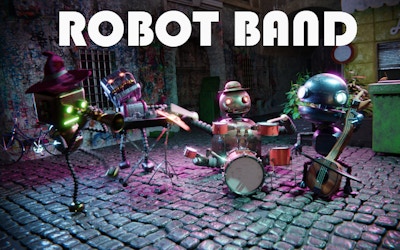





Robot Band
Play Robot Band online and make the robots perform. While they play, use the sliders to change the sound and the scene.
Game info
| Item | Details |
|---|---|
| Genre | Interactive music, creative play |
| Platform | Web browser |
| Controls | Pointer or touch input; drag sliders |
| Main activity | Experiment with robots, sound, tempo, and visuals |
What is Robot Band?
Robot Band is an interactive music toy with robot performers and sliders for the music and visuals. You can adjust the tempo or change the scene’s color and timing while listening to the band.
Start by picking out one sound. Once you can hear its part in the performance, try another robot or move a slider.
How to play Robot Band
- Start the game and click or tap the stage to enable sound.
- Click or touch the robots to make them respond.
- Move the music sliders and listen for changes in sound and tempo.
- Use the visual controls to change the scene’s color and timing.
- Return to a setting you liked, then adjust one control to compare the result.
Controls
Click the performers with a mouse, or use supported touch input. To adjust a slider, drag it while keeping your pointer or finger inside the game frame.
Robot Band tips
Change one control at a time
Move one slider a little and listen before touching another. If you change several settings at once, it’s harder to tell which one caused the new sound.
Compare slow and fast settings
Try the same performance at a slower tempo, then a faster one. Make small adjustments so you can follow how the timing changes.
Explore the sound before the colors
Find a musical setting you like and leave those controls alone while you try the visual sliders. You can then compare the look of the performance without also changing its sound.
More music games
For character-based sound layering, try Sprunkybox. In Bardbeat, your hits play the melody on a four-lane chart. Neon Guitar is another keyboard rhythm challenge. Browse the Music Games collection to choose another style.
FAQ
What is Robot Band?
Robot Band is an interactive music toy. You make robots perform and use sliders to experiment with the music and its visual presentation.
How do you control Robot Band?
Use the pointer or touch input to interact with the robots. Drag the on-screen sliders to change the music and visuals.
Do I need musical experience to play Robot Band?
No. Start with one robot or one slider, listen to the change, and try another adjustment. You do not need to read sheet music.
Why can I not hear Robot Band?
Click or tap inside the game first, then check the game sound, the browser tab, and your device volume. Some browsers wait for an interaction before allowing audio.