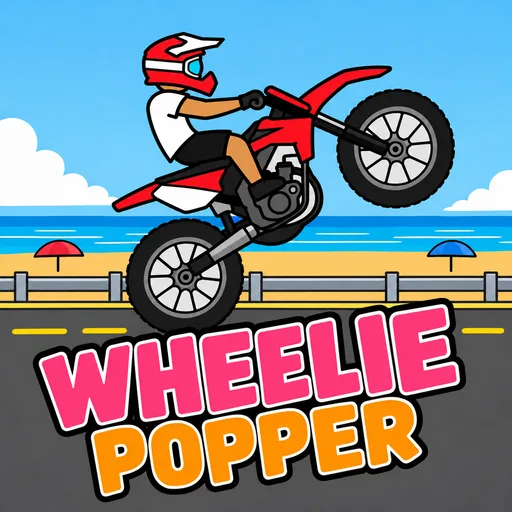




Wheelie Popper
Play Wheelie Popper online for free. No download, no sign-up. Ride a motorcycle down the road with its front wheel raised, and keep the bike from flipping backward.
Game info
| Item | Details |
|---|---|
| Genre | Arcade motorcycle stunt and balance game |
| Platform | Browser; desktop keyboard controls confirmed |
| Play time | Repeatable rides with no finish line |
| Price | Free |
| Controls | Arrow keys; W, A, S, D, and Space are also shown for gas |
| Main goal | Hold a wheelie, perform tricks, and improve your score |
What is Wheelie Popper?
Wheelie Popper is a side-view motorcycle game built around keeping the front wheel in the air. You control the bike’s speed while trying to hold a steady angle. Lean too far back and the rider flips, ending the attempt. The road keeps going, so a run is about how long you can stay upright and how many points you can collect.
The starting menu shows a red motorcycle on the Sunny Beach route, with Speed, Balance, and Tail attributes below it. There is an Upgrade button and a bike selector too. On the first ride, pay attention to how much gas it takes to lift the wheel and how quickly the bike leans back.
Gas and brake let you change pace during a wheelie. Once the motorcycle feels steady, you can stand or try a trick. The score and coin counters at the top of the screen track the ride.
How to play Wheelie Popper
- Wait for the game to load, then press Play on the motorcycle selection screen.
- Press Right Arrow to accelerate and raise the front wheel. Watch the bike’s angle instead of holding gas without a break.
- Use Left Arrow to brake if you need to slow down and regain control.
- When the wheelie is steady, try Up Arrow to stand or Down Arrow for a trick. Leave yourself time to settle the bike afterward.
- Keep riding to build your score. If the motorcycle flips backward, start another run and adjust when you press or release gas.
The opening play screen shows the controls before you move. Click inside the game frame if your keyboard input goes to the page instead of the motorcycle.
Controls
Desktop
- Right Arrow: gas.
- Left Arrow: brake.
- Up Arrow: stand.
- Down Arrow: trick.
- W, A, S, D, or Space: the game’s instruction screen also lists these as gas controls.
- Esc: pause.
The game shows these keys on its opening play screen. Use the arrow keys if you want separate controls for gas, brake, standing, and tricks.
Wheelie Popper tips
Start with a short wheelie
Tap gas long enough to lift the front wheel, then watch how quickly the motorcycle leans back. Short presses leave more room to correct the angle while you learn the bike’s response.
Treat the brake as a correction
When the bike picks up too much speed or leans too far back, ease off gas and brake. Let it settle before accelerating again.
Add tricks after the bike settles
Standing and tricks are available during the ride, but they draw attention away from balance. Establish a wheelie first. Then try one input and see how the motorcycle responds before adding another.
Use the result of each crash
If you flip backward, release gas earlier on the next attempt. If the front wheel drops too soon, press gas a little sooner. Change one input at a time so you can tell which adjustment helped.
Check the menu between attempts
The menu shows a coin balance, motorcycle attributes, and an Upgrade button. After earning coins, look at the available upgrades before the next ride. Speed and balance are both visible there, so choose based on the part of the run you are struggling to control.
Bikes, routes, and upgrades
The opening menu lets you switch motorcycles and shows Sunny Beach as the selected route. Speed, Balance, and Tail appear as separate bike attributes. During a ride, the game displays a timer, speed, coin count, and score. These readouts help you compare attempts even when a run ends quickly.
The game also presents standing and tricks as actions alongside gas and brake. They are most useful once you can hold the front wheel up without immediately tipping over. You can return to the menu after a run to review the bike and upgrade options.
More games like Wheelie Popper
Wheelie Party is another motorcycle wheelie challenge, with a simpler hold-and-release balance control. Stunt Rider 3D asks you to manage speed and the bike’s angle across ramps and gaps. Traffic Rider keeps you on a motorcycle but shifts the challenge to moving through traffic. For jumps and landings on a pedal bike, try Airborne BMX.
FAQ
Is Wheelie Popper free to play online?
Yes. You can play Wheelie Popper in your browser on this page without downloading an app or signing up.
What is the goal in Wheelie Popper?
Keep the motorcycle balanced on its rear wheel for as long as you can while building a higher score. Flipping backward ends the run.
What are the desktop controls in Wheelie Popper?
Right Arrow accelerates, Left Arrow brakes, Up Arrow makes the rider stand, and Down Arrow performs a trick. The game also shows W, A, S, D, and Space as gas controls.
Can you upgrade the motorcycle?
Yes. The main menu has an Upgrade option and shows Speed, Balance, and Tail attributes. Coins earned during play can be spent on upgrades.
How do I improve my score?
Build a steady wheelie before trying a stand or trick. Use brief gas inputs and brake when the bike begins to lean too far back.
Why is Wheelie Popper not loading?
Give the game frame a moment to load. If it stays blank, refresh the page and check that your browser allows embedded game content.
Last updated
Last updated: November 8, 2026. Game availability and controls can change when the embedded build is updated.