Brainrot Park
Play Brainrot Park online for free. No download or sign-up. Buy blocks, hatch Brainrots, combine matching creatures, and use their coin income to expand a 3D park.
Game info
| Item | Details |
|---|---|
| Genre | Idle merge, 3D management game |
| Platform | Browser; desktop recommended |
| Play time | Short sessions or longer idle progress |
| Price | Free |
| Controls | Keyboard and mouse |
| Main loop | Buy blocks, hatch Brainrots, combine duplicates, spend coins again |
| Similar to | Idle merge games, collection games, park-building games |
What is Brainrot Park?
Brainrot Park is a 3D idle merge game where a small starting park slowly fills with coin-producing Brainrots. Buy a basic block, open it, and the new creature starts earning while you decide where the next coins should go.
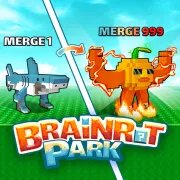
Duplicates are where the game starts to pay off. Combine two matching Brainrots to make a higher-tier one. It takes up less room than the pair and earns more coins, which makes the next block easier to afford.
Once the park gets crowded, space matters as much as coins. Deal with matching pairs before buying a run of cheap blocks. A few stronger Brainrots usually leave you in a better position than a full park of low-tier duplicates.
How to play Brainrot Park
- Start the game and move around the park.
- Open the shop when you have enough coins for a block.
- Place or interact with the block, then open it to hatch a Brainrot.
- Let the new Brainrot earn coins while you save for another block or an upgrade.
- Combine matching duplicates into a higher-tier Brainrot.
- Use the extra income for more blocks, more room, or park upgrades.
- Keep repeating this until your collection can support the next purchase easily.
Every purchase has a tradeoff. Cheap blocks fill the park quickly, but they can leave you with too many duplicates and nowhere to put the next hatch. Saving for a better block takes longer, though it can make the next merge worth more.
Controls
Desktop
- Move: W, A, S, D or arrow keys
- Look and interact: mouse
- Action: E
- Shop: G
- Equip tool: F
- Choose item slots: 0-9
- Open collection: Tab
- Open settings: Esc
If a later update changes a key, follow the prompts shown in the game.
Mobile
The game runs in a browser, but the documented controls rely on a keyboard and mouse. Desktop is the safer choice for movement, camera control, and item slots.
Brainrot Park tips
Merge duplicates before buying too many basic blocks
Basic blocks get the collection moving, but duplicates use up floor space fast. When you have a matching pair, combine it before filling the remaining spots with more low-tier Brainrots.
Let income set your spending pace
You do not need to spend every few coins as soon as they arrive. Wait for a purchase that helps the park grow, whether that means another block, more room, or a better chance at a stronger hatch.
Keep space for the next hatch
Keep at least one spot open before you buy another block. When the park feels cramped, combine duplicates first. Hoping the next hatch fixes the layout usually makes it worse.
Use active opening when you want a faster cycle
Interacting with a block, including active clicks, can shorten the wait for a hatch. Use it when you have room for the new Brainrot, not when several unopened blocks are already competing for space.
Treat rare blocks as an investment
More expensive blocks can pay off, but buy them after the park earns enough to recover the cost. A steady group of coin-producing Brainrots makes those purchases easier to absorb.
Check the collection when progress feels slow
Use the collection view when progress starts to feel aimless. It shows what you have found and can help you pick a merge goal instead of buying blocks at random.
Blocks, Brainrots, and park growth
| Element | Role in game | Player tip |
|---|---|---|
| Blocks | Each new Brainrot starts inside a block | Buy one only when you have room to deal with the hatch. |
| Brainrots | Creatures that earn coins in your park | Keep strong finds and combine duplicates. |
| Merge | Combines matching Brainrots into a higher tier | Combine early when duplicates start taking over the park. |
| Coins | Currency for blocks and park upgrades | Spend them on the purchase that helps your current park most. |
| Item slots | Quick access to carried items | Use the number keys to change slots without losing your place. |
| Collection | A record of your discovered Brainrots | Check it when you need a target for the next few hatches. |
Why players like Brainrot Park
- The small starting area slowly turns into a busy park with its own collection of creatures.
- A duplicate is rarely useless because it may complete the next merge.
- Coins keep coming in while you decide what to buy next.
- Moving around the 3D park makes floor space part of the puzzle.
- Even a short session can leave you with one stronger Brainrot or a helpful upgrade.
More games like Brainrot Park
For a board-based version of character merging, try Merge Brainrot. Italian Brainrot 2048 uses the same idea in a number puzzle.
Lucky Brainrot Blocks Online also uses lucky blocks and a 3D collection loop. Italian Brainrot Clicker drops the park management and focuses on taps and upgrades.
FAQ
Is Brainrot Park free to play?
Yes. Brainrot Park runs in the browser, so you can start playing without installing a separate app.
What type of game is Brainrot Park?
Brainrot Park is a 3D idle merge game. You buy blocks, hatch Brainrots, combine matching ones, and spend the coins they earn on more park space and blocks.
How do you control Brainrot Park?
Move with WASD or the arrow keys. Use the mouse to look around and interact, E for actions, G for the shop, F to equip a tool, and number keys to choose item slots. Check the on-screen prompts if the game updates its controls.
How do you make more coins in Brainrot Park?
Hatch new Brainrots and combine matching duplicates into higher tiers. Stronger Brainrots earn more coins, which you can spend on another block, more room, or the next park upgrade.
Can I play Brainrot Park on mobile?
Brainrot Park runs in a browser, but its documented controls use a keyboard and mouse. Desktop is the more reliable way to play.
Why is Brainrot Park not loading?
Refresh the page and give the Unity WebGL game time to finish loading. If it still does not start, make sure your browser allows embedded game content and close other heavy tabs before trying again.
Last updated
Last updated: July 22, 2026. The game host can change availability, controls, or browser behavior in later updates.