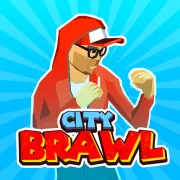

City Brawl
Play City Brawl online for free. No download, no sign-up. Take on city gangs, grab whatever they drop, and build a stronger fighter for the next level.
Game info
| Item | Details |
|---|---|
| Genre | 3D street fighting and beat em up game |
| Platform | Browser; desktop keyboard recommended |
| Play time | Level-based battles with repeatable difficulty settings |
| Price | Free |
| Controls | Arrow keys, Q, W, E, R, and Space |
| Main goal | Clear every enemy wave and defeat the stage boss |
| Similar to | Arcade beat em ups, wave fighters, and upgrade games |
What is City Brawl?
City Brawl is a 3D beat em up about cleaning gangs out of one city street after another. Enemies arrive in groups and can close in from both sides. Clear the current wave and another takes its place, with tougher opponents and bosses waiting deeper into the game.
You have enough moves to deal with those situations in different ways. A punch comes out quickly at close range. A kick reaches farther and can buy some space. You can grab a lone enemy, pick up objects from the street, block a strike, or jump away when the crowd gets too tight.
Defeated enemies drop oranges, the currency used for health, punch power, kick power, weapon technique, and new fighters. Bananas restore health. Crates can hold fruit or weapons, so it pays to look around after the last enemy in a wave goes down. That short pause is safer than trying to break boxes while somebody is swinging at you.
How to play City Brawl
- Pick a fighter, then choose Easy, Normal, Hard, or Insane difficulty.
- Move with the Arrow keys and try to keep the gang in front of you.
- Use Q for quick punches and W for kicks with a little more reach.
- Press E to grab an enemy or pick up an object. Press R to block a strike you cannot avoid.
- Clear the nearby enemies before breaking crates and collecting oranges, bananas, or weapons.
- Finish every wave with some health left, then deal with the stronger enemy or boss at the end of the stage.
- Use your oranges before the next level if one part of your fighter feels underpowered.
Attacking from the middle of a crowd usually ends badly. Move toward open ground and let the enemies follow. Once most of them are on the same side, a missed punch is much less likely to expose your back.
Controls
Desktop
- Move: Arrow keys
- Punch: Q
- Kick: W
- Grab an enemy or pick up an object: E
- Block: R
- Jump: Space
- Menus and selections: mouse or left click
Mobile
Touch controls for this embedded build have not been verified. A desktop browser with a keyboard is the recommended way to play.
City Brawl tips
Do not get boxed in
Watch the space behind your fighter before starting a combo. If an enemy slips around you, stop attacking and move through the nearest opening. A shorter combo from a good position is safer than finishing one while taking hits from behind.
Punch up close, kick for space
Q works well when an opponent is already within arm’s reach. W reaches farther, which makes it useful against the first enemy in an approaching group. Mix the two according to distance instead of relying on the same attack for every exchange.
Block, then get moving
Press R when you see a strike coming. Once it lands on the block, counter or step away. Staying in place gives the other enemies time to surround you, even if the first attack did no damage.
Grab enemies away from the crowd
E is easiest to use against someone who has moved ahead of the group. Grab that enemy before the others catch up, then move as soon as the action finishes. Trying the same move in the middle of a pack leaves plenty of time for an interruption.
Leave crates until the street is clear
Crates may contain oranges, bananas, or weapons, but they are poor targets while an enemy is in range. Deal with the fight first. You can search the stage during the pause before the next wave.
Buy the upgrade you are missing
If regular enemies take too long to put down, improve the attack you use most. Buy health when you can reach a boss but cannot stay alive long enough to beat it. Weapon technique is worth the oranges when found weapons already do much of the work in a successful run.
Do not waste a banana
A banana picked up at nearly full health has little value. When the area is safe, leave it on the ground until you have taken damage. Keep an eye on nearby enemies while you wait, since they can cost you more health than the banana restores.
Fighters, resources, and difficulty
| Element | Role in the game | Player tip |
|---|---|---|
| Fighters | Nine characters with different starting stats can be unlocked | Choose one that suits the attacks you use most often. |
| Oranges | Pay for upgrades and new fighters | Spend them before moving to a harder level if your current stats feel weak. |
| Bananas | Restore health during a stage | Wait until you have taken damage before collecting one. |
| Crates | May contain fruit or weapons | Break them when no nearby enemy can interrupt you. |
| Weapons | Give you another way to hurt enemies | Pick them up with E, but do not walk into a crowd just to reach one. |
| Difficulty settings | Easy, Normal, Hard, and Insane control the challenge | Start on Easy or Normal while learning the controls. |
Why players like City Brawl
City Brawl fits movement, two attacks, grabbing, blocking, and jumping onto a small set of keys. The controls are quick to learn, but a careless attack can still leave your fighter trapped between two enemies.
The oranges collected during a fight carry into upgrades and fighter unlocks. That gives even a rough run some value. Easy and Normal leave room to learn how each move works, while Hard and Insane demand better positioning and fewer wasted attacks.
More games like City Brawl
Ragdoll Playground is a 2D physics sandbox with characters, vehicles, tools, and weapons. It drops the enemy waves and lets you arrange the scene yourself.
Ragdoll Sandbox offers similar experimentation in a 3D build mode. Undead Corridor is more focused: survive increasingly difficult zombie waves by managing weapons, reloads, and close-range kicks.
FAQ
Is City Brawl free to play online?
Yes. City Brawl runs in your browser on this page, so you do not need to download a separate app or file.
What type of game is City Brawl?
City Brawl is a 3D beat em up where you fight gangs across city stages, clear enemy waves, collect resources, and improve your fighter between levels.
How do you control City Brawl?
Use the Arrow keys to move, Q to punch, W to kick, E to grab an enemy or pick up an object, R to block, and Space to jump.
What are oranges used for in City Brawl?
Oranges are the game currency. Spend them to improve health, punch power, kick power, and weapon technique, or save them to unlock another fighter.
How do you recover health in City Brawl?
Pick up bananas during a stage to restore health. Break crates when the area is safe because they can contain bananas, oranges, or weapons.
Can I play City Brawl on mobile?
The game is available in a browser, but touch controls for this embedded build have not been verified here. A desktop keyboard is the recommended setup.
Why is City Brawl not loading?
Give the 3D game time to download its files, then refresh the page if it remains blank. Also allow embedded game content and close other demanding tabs before trying again.
Last updated
Last updated: September 22, 2026. Game availability, browser behavior, controls, and progression can change when the embedded build is updated.