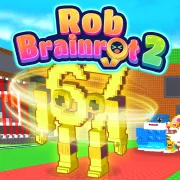

Rob Brainrot 2
Play Rob Brainrot 2 online for free. No download, no sign-up. Start with a cheap Brainrot, take it back to base for cash, then decide whether to build safely or gamble on a raid.
Game info
| Item | Details |
|---|---|
| Genre | 3D collection, base raid, idle income |
| Platform | Browser, desktop recommended |
| Play time | Quick runs with progress that carries over |
| Price | Free |
| Controls | Keyboard and mouse |
| Main loop | Get a Brainrot home, spend its cash, and protect the base |
| Similar to | 3D collection and base raid games |
What is Rob Brainrot 2?
Rob Brainrot 2 is a 3D collection game where your money source sits right in your base. Once a Brainrot is home, it starts earning cash. More Brainrots mean more income, but they also give rivals a better reason to come after you.
You can buy an available Brainrot or try to take one from another base. Picking one up is only half the job. You still have to get back with it, then keep your own base safe long enough for the new income to matter.
The browser build has a shop, base protection, skins, weapons, Lucky Spin, and rebirth. Check the price and effect on screen before you spend cash or reset a collection that is already paying well.
How to play Rob Brainrot 2
- Start the game and wait for the 3D world to load.
- Buy the first Brainrot you can afford.
- Get it back to base so it starts earning cash.
- Put the cash into another Brainrot or a useful option from the game menus.
- Check your base protection as the collection becomes more valuable.
- Raid when you have a clear way to get the find home.
- Keep building income, but do not leave the base easy to raid.
The first few minutes usually go better when you get reliable income running. A rare find can speed things up, but it does nothing for you until it is safe at home.
Controls
Desktop
- Move: W, A, S, D or arrow keys
- Jump: Space
- Interact: E
- Camera and menus: Mouse
- Shop: V
- Rebirth: R
- Return home: G
- Lucky Spin: T
- Settings: P
Mobile
The game opens in a browser, but the confirmed controls use a keyboard and mouse. Desktop is the recommended option because touch controls for this build are not confirmed.
Rob Brainrot 2 tips
Get base income working before a raid
Start with a few affordable Brainrots and let them pay out. A small income gives you a way back after a failed raid, so one bad steal does not stop your run.
Take a valuable find straight home
Once you pick up a Brainrot from another base, head home. Going after a second target can cost you the first one before it earns a single coin.
Treat rare finds as a defense problem too
Rare Brainrots can raise your income quickly, but they make your base harder to ignore. Check your protection before you head out again, especially after a good pickup.
Use the shop with a current goal in mind
Do not spend cash just because the shop is open. Pick one job for the next purchase: more income, better protection, or help with the route you want to run. That makes the next raid easier to judge.
Read the rebirth reward before resetting
Rebirth resets progress for a longer-term reward. Compare the reward on screen with the cash your current collection earns before you start over.
Brainrots, bases, and progression
| Element | Role in game | Player tip |
|---|---|---|
| Brainrots | Collectibles that earn cash at your base | Build a reliable group before you chase a big raid. |
| Base | Holds the collection that produces income | Take a stolen find home before looking for another target. |
| Cash income | Pays for more Brainrots and progress options | Save for the next useful purchase instead of scattering small upgrades. |
| Base protection | Helps keep rivals away from your collection | Check it whenever your income takes a jump. |
| Shop | Shows the available progress options | Look at the cost and the payoff before spending. |
| Lucky Spin | Gives an extra chance at a reward | Treat it as a bonus, not your main plan. |
| Rebirth | Resets progress for a later reward | Make sure the reward beats the income you are giving up. |
Why players play Rob Brainrot 2
- Each new Brainrot changes what your base can earn.
- A raid can make a quick session exciting because the return trip is part of the risk.
- Moving through the 3D world gives every pickup a practical question: can you get it home?
- Even a short run can end with more income, a safe delivery, or one solid upgrade.
More games like Rob Brainrot 2
For another collection game built around base raids, try Steal Brainrots. You collect Brainrots for cash, protect the base, and choose when to raid.
Lucky Brainrot Blocks Online is slower and built around opening blocks and upgrading your base. Escape Tsunami for Brainrots adds survival pressure to the trip back. Brainrot Park turns the same theme into an idle merge game.
FAQ
Is Rob Brainrot 2 free to play?
Yes. You can play Rob Brainrot 2 free in your browser without downloading a separate app.
What type of game is Rob Brainrot 2?
Rob Brainrot 2 is a 3D collection, base raid, and idle income game. You collect Brainrots for your base, use their cash income to grow, and protect them from rivals.
How do you control Rob Brainrot 2?
Use WASD or the arrow keys to move, Space to jump, E to interact, and the mouse for the camera and menus. The build also uses keys such as V for the shop, R for rebirth, G for home, T for Lucky Spin, and P for settings.
How do you make money in Rob Brainrot 2?
Put Brainrots in your base to earn cash, then use that income to buy more Brainrots or make progress through the options shown in the game. Rarer finds can earn more, but they also make your base a more tempting target.
Can I play Rob Brainrot 2 on mobile?
The game opens in a browser, but the confirmed controls use a keyboard and mouse. Desktop is the recommended option because touch controls for this build are not confirmed.
Why is Rob Brainrot 2 not loading?
Refresh the page and give the 3D game time to load. If it still will not start, allow embedded game content in your browser and close other heavy tabs before trying again.
Last updated
Last updated: August 3, 2026. Game availability, controls, and progression can change if the embedded build is updated.