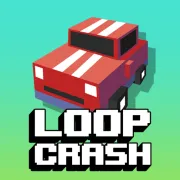


Loop Crash
Play Loop Crash online for free. No download, no sign-up. The car steers around the loop on its own. You decide when to speed up or slow down before each traffic crossing.
Game info
| Item | Details |
|---|---|
| Genre | Endless arcade driving and traffic timing game |
| Platform | Browser, desktop, and mobile |
| Play time | Short repeatable high-score runs |
| Price | Free |
| Controls | D to accelerate, A to brake, and on-screen pedals on mobile |
| Main goal | Complete more laps without colliding with crossing traffic |
| Progression | Earn coins and unlock more vehicles and riders |
| Similar to | Speed-control games, traffic-dodging games, and endless score challenges |
What is Loop Crash?
The car follows a fixed loop, leaving you in charge of the throttle and brake. Another stream of traffic cuts across the route. Reach a crossing at the same time as another vehicle and the run ends there.
The opening laps leave plenty of space. More vehicles join as the score climbs, and the gaps soon become harder to judge. A slow truck may hide a faster car behind it. Two cars that look far apart can also meet by the time they come around the loop again.
Each completed lap raises the score and pays coins. The coins carry over after a crash and unlock more rides in the garage, including regular cars and a few unusual vehicles and riders.
How to play Loop Crash
- Press Play and wait for the game frame to load.
- Pick the available starter vehicle and begin the run.
- Look ahead to the next crossing and follow the traffic moving toward it.
- Hold D when you can accelerate through an open gap.
- Hold A when another vehicle will reach the crossing first.
- Release both keys to return to the normal cruising speed.
- Finish laps to build your score and collect coins for the garage.
- After a crash, restart and adjust the decision that sent you into traffic.
The brake slows the car without stopping it. Press it while the crossing is still some distance away. Switching between A and D at the last second rarely leaves enough room to avoid a collision.
Controls
Desktop
- Accelerate: hold D.
- Brake: hold A.
- Cruise at normal speed: release both keys.
- Steering: automatic along the loop.
- Menus, garage, settings, and restart: use the visible buttons in the game frame.
Mobile
- Accelerate: hold the on-screen pedal at the lower right.
- Brake: hold the on-screen pedal at the lower left.
- Steering: automatic along the loop.
Loop Crash tips
Keep your eyes on the crossing
Steering is automatic, so the crossing deserves most of your attention. Follow the traffic on both sides and estimate which vehicle will arrive first. If you wait until it reaches your car, the gap has probably gone.
Brake while you still have room
Start slowing while there is still road between the car and the intersection. You can press D again if traffic clears early. Waiting until another vehicle is already in front of you leaves almost no room to recover.
Use a gap before it closes
When one vehicle has passed and the next is still far away, hold D and clear the intersection. Check the far side first. A quick escape from one lane can put you directly in the path of traffic at the second crossing.
Wait for the whole vehicle to pass
Long trucks stay in the crossing after the cab has gone through. Keep braking until the rear clears. At night or against a busy background, follow the full outline because the headlights can make a long vehicle look shorter.
Follow traffic around the loop
Traffic that looks evenly spaced can bunch up on the next lap. Watch where faster cars catch slower ones. Their meeting point often tells you more about the next gap than the space currently in front of your bumper.
Build coins with safe laps
Coins come from completed loops. A doubtful dash can end the run just before the next payout, so slow early when the opening looks tight and wait for the traffic to spread out again.
Fix one crossing at a time
A crash usually starts with a late brake or a burst of speed into a shrinking gap. Change that moment on the next attempt and leave the other crossings alone. Because the route repeats, you can work out exactly where you need more room.
Vehicles, traffic, and progression
| Element | Role in the game | Player tip |
|---|---|---|
| Automatic loop | Carries your vehicle around the fixed route | Let the game steer while you focus on arrival time. |
| Traffic crossings | Create the main collision risk | Read both approaching lanes before changing speed. |
| Acceleration | Moves you through a gap sooner | Use it when the opening is widening and the exit is clear. |
| Braking | Reduces speed without stopping completely | Start early enough to let another vehicle pass first. |
| Completed laps | Increase the score and coin total | Choose repeatable safe gaps when chasing a record. |
| Coins | Pay for additional vehicle and rider unlocks | Build the balance with steady laps and early braking. |
| Garage | Holds the available rides | Use a familiar silhouette when judging tight spaces. |
| High score | Records the best completed run | Fix one bad crossing decision on each retry. |
Why players like Loop Crash
Loop Crash gets plenty of tension from two keys. The road handles the turns while A and D change when you reach each crossing. When a run ends, the mistake is usually easy to spot: you braked late or accelerated into a gap that was already closing.
Restarts are quick, and the high score gives every short run a clear target. Coins also carry progress into the garage. The route becomes familiar after a few attempts, but the growing traffic keeps the crossing times from settling into a fixed rhythm.
More games like Loop Crash
Loop Crash 2 keeps the same speed controls and adds Easy and Hard layouts, extra crossing points, and more reward activities.
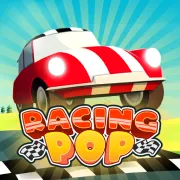
The car steers itself in Racing Pop too. You manage the approach to each corner by deciding when to release the throttle.
Traffic Rider puts you on a motorcycle with direct steering, acceleration, and braking through busy highway traffic.
Crashy Rush has short runs and vehicle unlocks as well, though its car rolls downhill while you steer around traffic and other hazards.
FAQ
Is Loop Crash free to play online?
Yes. Loop Crash runs in your browser on this page, with no app to download and no sign-up required.
What type of game is Loop Crash?
Loop Crash is an endless arcade driving game about controlling speed on an intersecting loop. The vehicle steers itself, and each run continues until you collide with traffic.
How do you control Loop Crash on desktop?
Hold D to accelerate and A to brake. Steering is automatic, and releasing both keys lets the vehicle continue at its normal cruising speed.
Can you stop the vehicle in Loop Crash?
No. Braking slows the vehicle but does not bring it to a complete stop, so you need to react before reaching a busy crossing.
Can I play Loop Crash on mobile?
Yes. The touch controls place the brake pedal at the lower left of the game and the accelerator at the lower right.
What are coins for in Loop Crash?
Completed laps add to your score and award coins. You can save those coins and use them to unlock more vehicles and riders for later attempts.
Why is Loop Crash not loading?
Reload the page and let the game frame finish downloading its files. If it remains blank, check that your browser allows embedded content and try a current browser.
Last updated
Last updated: October 25, 2026. Game availability, browser behavior, and controls can change when the embedded build is updated.