



Speed Slope
Play Speed Slope online for free. No download required. Guide a rolling ball down a neon track, slip around red blocks, and stay clear of the edges as the pace rises.
Game info
| Item | Details |
|---|---|
| Genre | 3D arcade endless runner |
| Platform | Browser; desktop keyboard controls confirmed |
| Play time | Repeatable distance runs |
| Price | Free |
| Controls | A and D or Left and Right Arrow keys |
| Main goal | Travel farther without hitting a red obstacle or falling |
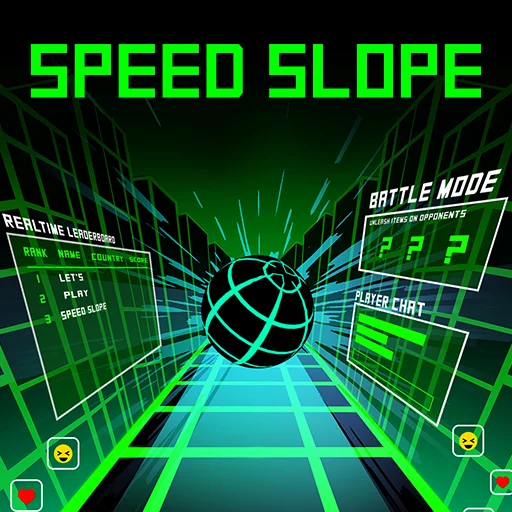
| Extra modes | Battle Mode and real-time leaderboard |
What is Speed Slope?
Speed Slope is a downhill ball runner. The ball moves forward automatically along a suspended neon course. You steer left and right to stay on the track and pass red obstacles. A fall or collision ends the attempt; the distance you covered is your score.
As the ball speeds up, a gap may appear just after you pass a block. Look for where the track goes next before you steer around the first hazard. The game also has a Battle Mode and a leaderboard for comparing runs with other players.
On first load, the game shows a welcome screen with a Start New Game button. It also provides a recovery ID field for returning players. You can begin a fresh run from that screen without entering an ID.
How to play Speed Slope
- Let the game frame load, then choose Start New Game on the welcome screen.
- Watch the track ahead while the ball rolls forward on its own.
- Press A or Left Arrow to steer left; press D or Right Arrow to steer right.
- Move onto an open part of the track before a red block or gap reaches you.
- Release the key once you have cleared the hazard so the ball does not drift toward the opposite edge.
- Keep the run going to increase your distance score. After a crash, start another run and try a cleaner line.
The middle may be blocked, and the next platform may sit off to one side. Look past the nearest hazard so your dodge also lines up with the track beyond it.
Controls
Desktop
- Steer left: A or Left Arrow.
- Steer right: D or Right Arrow.
- Forward movement is automatic.
- Use the on-screen menu buttons to start or restart a run and to select a mode.
The game responds best when the frame has keyboard focus. Click inside it if the steering keys do not respond after you start.
Speed Slope tips
Start moving before the obstacle fills the screen
Start steering while the block is still ahead. A short move leaves room to straighten out; a late dodge can send the ball right across the track.
Keep an eye on the far edge
Dodging a block is only half the move. If you keep holding the same key after passing it, you can trade a collision for a fall. Release the key once the ball is on a safe line.
Use short corrections at high speed
As the run accelerates, the same length of key press moves you farther down the course. Try a brief tap, check where the ball is heading, and tap again if needed. A single long hold is harder to correct on a narrow section.
Choose a landing path before a gap
The course has sudden drops and broken sections. Aim for the receiving track while you still have ground beneath the ball. A last-second sideways adjustment may leave you between platforms.
Separate survival from competition
Try the regular run first and notice where the same turns catch you. Once you can get through them reliably, take that route into Battle Mode or use it to improve your leaderboard score.
Game elements
| Element | Role in the game | Player tip |
|---|---|---|
| Rolling ball | Moves forward while you steer | Use short left-right corrections as speed builds. |
| Neon track | Holds the route through turns and drops | Look beyond the nearest obstacle for the next safe line. |
| Red obstacles | End the run on contact | Begin moving early and stop steering once clear. |
| Gaps and edges | End the run if the ball falls | Line up with the next platform before the gap. |
| Distance score | Measures how far the run lasts | Favor a safe route over a risky shortcut. |
| Battle Mode | Adds direct competition | First learn how the ball responds in a normal run. |
| Leaderboard | Compares runs with other players | Build a consistent route before chasing rank. |
Why play Speed Slope?
There are only two steering directions to learn. The hard part is releasing a key at the right moment. Hold it through a red block and the ball may clear the obstacle, then roll off the far edge.
The next run starts quickly. If the same obstacle ended your last attempt, steer a little earlier or release sooner and see where the ball lands. Once that section stops being a problem, the leaderboard and Battle Mode give you another target.
More games like Speed Slope
Slope offers the original downhill ball challenge with red obstacles and a rising pace.
Slope 2 adds twisting tracks and speed-boost sections to the same left-right steering rhythm.
Slope 3 sends the ball through suspended tracks, tunnels, and gaps. Slope Xtreme begins with a charged launch before the rolling course.
FAQ
Is Speed Slope free to play online?
Yes. You can play Speed Slope in your browser on this page without downloading an app.
What is the goal in Speed Slope?
Keep the rolling ball on the track, avoid red obstacles and gaps, and travel as far as you can before a crash ends the run.
How do you steer in Speed Slope?
Use A and D or the Left and Right Arrow keys. The ball moves forward on its own.
What ends a Speed Slope run?
Hitting a red obstacle or falling off the track ends the run. Distance determines your score.
Does Speed Slope have a Battle Mode?
Yes. Alongside the distance run, the game offers a Battle Mode and a real-time leaderboard.
Why is Speed Slope not loading?
Give the 3D game frame time to load. If it stays blank, refresh the page and check whether your browser allows embedded game content.
Last updated
Last updated: November 5, 2026. Game availability and embed behavior can change when the game build is updated.