


Slope 2
Play Slope 2 online for free. No download, no sign-up. Steer a rolling ball down twisting neon tracks, slip past red obstacles, and keep it away from the edges as the speed picks up.
Game info
| Item | Details |
|---|---|
| Genre | 3D arcade, endless runner |
| Platform | Browser; desktop keyboard controls confirmed |
| Play time | Short high-score runs |
| Price | Free |
| Controls | A and D or Left and Right Arrow keys to steer |
| Main goal | Stay on the track and beat your previous score |
| Similar to | Fast ball runners and precision obstacle games |
What is Slope 2?
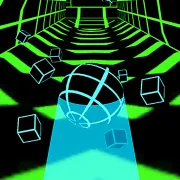
Slope 2 is a 3D endless runner with two controls: left and right. The ball rolls on its own while the track drops away beneath it, bends to either side, and splits into separate platforms. Touch a red obstacle or fall into open space and the run is over.
Early sections are wide enough to learn how the ball responds. Later, the speed rises and the track gives you less room to recover. Moving hazards, tighter turns, ramps, and sudden gaps can punish a key press held for a fraction too long.
Arrow symbols appear on parts of the track, on blocks, and inside some tunnels. Crossing one boosts the ball’s speed. Take the boost when you can already see a safe line through the next section. If the track ahead is narrow or hidden around a bend, leave it alone.
How to play Slope 2
- Press Play and wait for the game frame to load.
- Click inside the frame so it receives keyboard input.
- Once the ball begins rolling, use A and D or the Left and Right Arrow keys to steer.
- Pick an open line before the next red block, gap, or narrow platform reaches the ball.
- Line up with the next platform while you are still on the ramp. There is no jump button and little room to change direction in the air.
- Cross an arrow-marked boost only when the next stretch has enough space for the extra speed.
- If you crash or fall, restart and try the same section with an earlier or shorter input.
Late turns tend to become hard turns. The ball may clear the first obstacle, keep sliding sideways, and fall from the other edge. Start moving while there is still track in front of you, then release the key before the ball crosses too far.
Controls
Desktop
- Steer left: A or Left Arrow.
- Steer right: D or Right Arrow.
- Menus and restart: use the visible controls in the game frame.
- Jump: there is no jump control; ramps and the shape of the track carry the ball across gaps.
Mobile
This page only confirms desktop keyboard controls. Touch controls and performance on a phone or tablet depend on the embedded build and device.
Slope 2 tips
Return to the middle when you can
Wide sections give you a chance to move away from the edge. From the middle, you can react in either direction when the track splits or a red block fills one side. Do not force the move on a narrow platform. Wait until the course opens up.
Use quick taps at higher speeds
Holding a key sends the ball farther sideways than you may expect. Tap once and watch the line before pressing again. On a narrow or curved section, two small corrections are usually easier to judge than one long sweep.
Read past the gap
Look past the obstacle in front of you. An opening may lead toward the edge of the next platform or leave a red block directly in the landing path. Choose a line that gives you somewhere to go after the first dodge.
Line up before a ramp
Ramps carry the ball across gaps automatically. Because there is no jump button, most of the work happens before takeoff. Point the ball toward the receiving platform while its wheels are still on solid ground, then ease off the steering key near the lip.
Be selective with boosts
Arrow-marked boosts leave less time for the next decision. They are safest on a wide stretch with the route visible ahead. A boost just before a blind turn or narrow landing can make an otherwise manageable section much harder.
Let the ball settle after a dodge
Release the steering key once the obstacle is behind you. If the ball keeps drifting through the open space, tap the opposite direction briefly before setting up the next move.
Game elements
| Element | Role in game | Player tip |
|---|---|---|
| Rolling ball | Moves forward automatically and keeps some sideways momentum | Use light taps once the pace starts to rise. |
| Neon tracks | Shift between wide slopes, bends, and narrow platforms | Watch the next section before choosing a line. |
| Red obstacles | End the run as soon as the ball touches them | Begin steering while you still have room to make a small correction. |
| Gaps and ramps | Separate one piece of track from the next | Aim at the landing before the ball leaves the ramp. |
| Moving hazards | Open and close safe routes across the track | Watch one movement cycle when you have enough space. |
| Arrow power-ups | Speed up the ball | Take one when the next part of the track is already visible. |
Why players like Slope 2
There is almost nothing to memorize before the first run. The difficulty comes from judging how early to steer and when to release the key. As the ball speeds up, an input that felt gentle near the start may send it straight across a narrow platform.
Each mistake gives you something specific to change. Move sooner for a red block, shorten a turn near an edge, or approach the next ramp from a better angle. Restarting is quick, so you can test the adjustment right away.
More games like Slope 2
Slope Xtreme begins with a charged cannon launch, then sends the ball across suspended 3D tracks.
Tap Road 2 uses a neon ball and simple lane changes for another fast obstacle run.
Slope Rider trades the ball for a sled and adds jumps to its snowy downhill route.
Run 3 takes place in floating tunnels where jumps and wall running open different routes.
FAQ
Is Slope 2 free to play online?
Yes. You can play Slope 2 in your browser on this page without downloading a separate app.
What type of game is Slope 2?
Slope 2 is a 3D arcade endless runner. You steer a ball down neon tracks, avoid red obstacles and gaps, and try to keep the run going as the speed rises.
How do you control Slope 2?
Use A and D or the Left and Right Arrow keys to steer. The ball moves forward automatically, and there is no jump button.
What ends a run in Slope 2?
A run ends when the ball hits a red obstacle or falls off the track. You can then restart and try to beat your previous score.
What do the arrow power-ups do in Slope 2?
Arrow-marked track sections, blocks, and tunnels give the ball a speed boost. The extra pace can help you move farther, but it leaves less time to react.
Can I play Slope 2 on mobile?
This page only confirms desktop keyboard controls. Touch controls and performance on a phone or tablet depend on the embedded build and device.
Why is Slope 2 not loading?
Reload the page and give the game frame a moment to start. If it still does not load, check that your browser allows embedded game content, then try a current desktop browser.
Last updated
Last updated: October 8, 2026. Game availability, browser behavior, controls, and route features can change when the embedded build is updated.