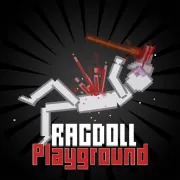





Ragdoll Playground
Play Ragdoll Playground online for free. No download, no sign-up. Place ragdolls and objects in a 2D scene, connect a few ideas, then let the physics turn your setup into something unexpected.
Game info
| Item | Details |
|---|---|
| Genre | 2D physics sandbox and simulation game |
| Platform | Browser; desktop controls confirmed |
| Play time | Open-ended sessions |
| Price | Free |
| Controls | Mouse and keyboard |
| Main focus | Build, test, destroy, and reset physics scenes |
| Content note | Includes weapons, explosions, and stylized ragdoll violence |
What is Ragdoll Playground?
Ragdoll Playground is an open-ended physics sandbox with no required mission or final score. Instead of moving through a fixed campaign, you choose objects from the inventory, place them in the scene, and decide what should happen next. A simple test might involve dropping a ragdoll from a platform. A larger setup could combine a vehicle, a barrier, and an explosive to create a chain reaction.
The objects do not all behave alike. Weight, collision, gravity, sharp edges, movement, and explosive force can change the result. That makes placement matter even when you are building something deliberately messy. Moving one object a little higher or turning it in another direction can produce a completely different reaction.
There is no wrong way to use the playground, but it helps to begin with one clear question. Will this structure stay upright? Can the vehicle clear the obstacle? What happens if two moving parts meet? Small experiments make it easier to see which object caused the result.
How to play Ragdoll Playground
- Press Play and wait for the sandbox to finish loading.
- Choose an environment or begin in the available scene.
- Open the item menu and select a ragdoll, vehicle, tool, weapon, explosive, or building object.
- Move the pointer to the place where you want the item and use E or Q to spawn it.
- Hold the left mouse button to drag an object. Use A or D when it needs a different angle.
- Press F to activate an interactive object after the scene is ready.
- Watch what happens, adjust one part, and run the test again.
Your first scene does not need many pieces. Put down one ragdoll and one interactive item, leave space around them, and learn how grabbing and rotation feel. Once that works, add a second object that changes the outcome.
Controls
Desktop
- Select an item or menu option: Left Click.
- Grab and move an object: hold and drag with the Left Mouse Button.
- Spawn or place an item: E or Q.
- Rotate an object: A or D.
- Activate an interactive object: F.
- Move around the map: Arrow Keys.
- Zoom the view: mouse wheel.
- Delete or adjust an object: select it and use the available object controls.
Click inside the game frame before using the keyboard. If a shortcut scrolls the page or does nothing, the frame probably does not have focus yet.
Mobile
This page confirms the desktop keyboard and mouse controls. Touch behavior depends on the embedded build, browser, and device, so a desktop browser is the recommended setup.
Ragdoll Playground tips
Test one change at a time
When a large scene fails, it can be difficult to tell why. Start with two or three pieces, run the simulation, then add one new part. If the result changes, you know what caused it.
Pause before activating anything
Arrange the scene first. Check that the ragdoll, moving object, and target are all where you intended before pressing the activation key. Triggering too early often knocks the setup apart before the interesting interaction begins.
Rotate objects before stacking them
A tilted support can make an entire build unstable. Use small rotation adjustments before placing another object on top, especially when making a ramp, bridge, or barrier.
Leave room for motion
Vehicles, falling pieces, and explosions need open space. If every object begins in a tight cluster, the first collision can hide the rest of the sequence. Spread the setup out so each stage has time to happen.
Use the camera to inspect the whole scene
Move and zoom until both the trigger and the final target are visible. A wider view helps you catch a loose part or missed collision that would be easy to overlook up close.
Reset a crowded experiment
Once the scene is full of broken or displaced pieces, rebuilding around the debris becomes harder than starting again. Use the visible reset or scene controls and recreate only the parts that worked.
Game elements
| Element | Role in the sandbox | Player tip |
|---|---|---|
| Ragdolls | React to impacts, falls, tools, and moving objects | Place one in a clear area while learning how a new item behaves. |
| Building pieces | Form platforms, barriers, ramps, and simple machines | Check the angle and stability before adding more weight. |
| Vehicles | Add motion and make crash or obstacle tests possible | Give the vehicle a clear route before activation. |
| Tools and weapons | Apply force or damage to a specific part of the scene | Test them separately before combining them with a larger setup. |
| Explosives | Create strong forces and chain reactions | Leave space between stages so one blast does not erase the whole experiment at once. |
| Object controls | Let you move, rotate, activate, or remove a selected item | Select carefully when several objects overlap. |
Why players like Ragdoll Playground
The game gives you a set of physical objects without telling you what must be built. That freedom supports quick experiments, carefully arranged machines, improvised crashes, and scenes made only to see how badly they fall apart.
It is also easy to learn from a failed setup. A platform tips, a moving part misses, or an explosion fires in the wrong direction. Instead of losing a long level, you can move one piece and immediately try again. The result belongs to the particular objects and positions you chose, so even a familiar idea rarely plays out in exactly the same way twice.
More games like Ragdoll Playground
Dude Theft Auto is a 3D open-city sandbox where vehicles and loose physics can turn a short trip into an unexpected detour.
Wacky Steps makes unstable physics the challenge, asking you to place each awkward step without falling.
A Small World Cup uses compact soccer matches and physics-driven contact for quick, unpredictable rounds.
FAQ
Is Ragdoll Playground free to play online?
Yes. You can play Ragdoll Playground in your browser on this page without downloading a separate app.
What type of game is Ragdoll Playground?
Ragdoll Playground is a 2D physics sandbox. You place ragdolls and objects, arrange a scene, activate interactive items, and watch the simulation react.
Does Ragdoll Playground have missions or levels?
No fixed mission, score target, or winning condition is required. You choose what to build or test and can reset the scene when you want a clean start.
How do you control Ragdoll Playground?
Use the mouse to select and drag objects. E or Q places items, A and D rotate an object, F activates an interactive item, the Arrow keys move the view, and the mouse wheel zooms.
Can I play Ragdoll Playground on mobile?
This page confirms keyboard and mouse controls for the embedded build. Touch behavior depends on the game version, browser, and device, so desktop play is recommended.
Why is Ragdoll Playground not loading?
Refresh the page and give the game frame a moment to load. If it still does not start, check that your browser allows embedded game content and try a current desktop browser.
Last updated
Last updated: September 12, 2026. Game availability, controls, and iframe behavior can change when the embedded build is updated.