Garfield War
Play Garfield War online for free. No download or sign-up. Move Garfield across the kitchen, call in companions, and keep food invaders away from the fridge.
Game info
| Item | Details |
|---|---|
| Genre | Side-scrolling tower defense and action strategy |
| Platform | Browser; desktop controls confirmed |
| Play time | Short defense stages |
| Price | Free |
| Controls | A/D or arrow keys to move; mouse for game actions |
| Main goal | Stop food invaders from reaching the fridge |
| Similar to | Tower defense, lane defense, and real-time strategy games |
What is Garfield War?
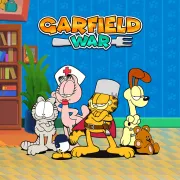
Garfield War puts you in a kitchen with one job: do not let the food invaders reach the fridge. Garfield attacks as they come in, but you still need to move him to the part of the line that is taking the most pressure.
Popcorn builds up during a stage and pays for companions such as Odie and Sheldon. They hold the line while Garfield backs them up where the invaders are closest.
It is easy to spend everything on the first group. The trouble starts when the next wave arrives and you have nothing left to reinforce the defense.
How to play Garfield War
- Press Play and wait for the game frame to load.
- Start the stage and watch which part of the kitchen the invaders are approaching.
- Move Garfield with A/D or the Left and Right Arrow keys to support the threatened area.
- Let popcorn build up, then use it to summon an available companion.
- Use a visible skill or upgrade when the defense starts slipping.
- Keep adding support as the invaders become harder to hold back.
- Clear the wave before enemies can reach the fridge.
Keep one eye on the gap between the invaders and the fridge. When the line is quiet, you can wait. When enemies are almost through, summon an available companion instead of saving until it is too late.
Controls
Desktop
- Move Garfield: A/D or the Left and Right Arrow keys.
- Deploy companions and interact: left mouse click.
- Skills, upgrades, menus, and restart: use the visible controls in the game frame.
Mobile
This page confirms the desktop keyboard and mouse controls. Touch behavior depends on the embedded build, browser, and device.
Garfield War tips
Save popcorn for the moment it changes the line
Popcorn matters most when the line starts to give way. Do not spend every point as soon as it appears, but do not save so much that the enemies reach the fridge before your next companion arrives.
Move toward the dangerous group
Garfield needs to be where the action is. If one group is closer to the fridge than the rest, move there instead of pacing back and forth across the kitchen.
Build a defense before the emergency
Do not wait for the whole line to collapse. Add support once a wave starts crowding one section, then move Garfield there to keep the new companion from getting overwhelmed.
Use skills on crowded attacks
Use a skill when several invaders are pressing the same spot. If the kitchen is calm, hold it for the next packed group or for the moment the fridge is in danger.
Spend upgrades on the problem you keep seeing
Do not buy an upgrade just because it is available. If weak invaders are already under control but later waves keep breaking through, save for the companion or upgrade that helps with those later waves.
Game elements
| Element | Role in game | Player tip |
|---|---|---|
| Garfield | The character you move around the defense | Stay near the invaders closest to the fridge. |
| Fridge | The objective you need to protect | A close enemy group needs attention first. |
| Food invaders | The waves moving through the kitchen | Reinforce before they break through. |
| Popcorn | The resource that pays for companions | Keep some in reserve for a difficult stretch. |
| Companions | Extra defenders that hold the line | Put them where the next wave needs help, not after the line has already failed. |
| Skills and upgrades | Ways to boost the defense or recover | Use skills under pressure and buy upgrades that fix a recurring weakness. |
Why players like Garfield War
The goal is simple: keep the invaders away from the fridge. The hard part is deciding when to move Garfield and when to spend popcorn on another companion.
After a close call, it is usually clear what went wrong. Garfield was on the wrong side, support came in late, or a skill was spent before the crowded part of the wave.
More games like Garfield War
Plants vs Brainrots also asks you to build support before incoming opponents overwhelm your side.
Thung Wars is a lane battle where units, upgrades, and pressure on each base decide the fight.
Backpack Dungeon uses item placement and combat choices instead of a moving defense line.
FAQ
Is Garfield War free to play online?
Yes. You can play Garfield War in your browser on this page without downloading a separate app.
What type of game is Garfield War?
Garfield War is a side-scrolling tower defense game where the action happens in real time. Move Garfield, call in companions, and stop food invaders before they reach the fridge.
How do you control Garfield War?
On desktop, use A/D or the Left and Right Arrow keys to move Garfield. Use the mouse for companions, upgrades, skills, and the buttons in the game frame.
What is the goal in Garfield War?
Protect the fridge from incoming food invaders. Clear each wave before the enemies get through your defense.
What is popcorn used for in Garfield War?
Popcorn pays for companions. Keep some ready for the point where a wave starts to break through.
Can I play Garfield War on mobile?
This page confirms the desktop keyboard and mouse controls. Touch behavior depends on the embedded build, browser, and device.
Why is Garfield War not loading?
Refresh the page and wait for the game frame to start. If it still does not load, check that your browser allows embedded game content and try a current desktop browser.
Last updated
Last updated: August 14, 2026. Game availability, browser behavior, and controls can change when the embedded build is updated.