

Shell Survivor
Play Shell Survivor online for free. No download, no sign-up. Move through a crowded graveyard while your weapons fire automatically, then spend each wave’s materials on a stronger build.
Game info
| Item | Details |
|---|---|
| Genre | Top-down arena survival shooter, roguelite |
| Platform | Browser; desktop keyboard recommended |
| Play time | Short waves; 20 waves in a standard run |
| Price | Free |
| Controls | WASD or Arrow keys, Q, E, Tab, Esc, and mouse menus |
| Main goal | Survive all 20 waves and defeat the final challenge |
| Similar to | Wave survival games, auto-attack shooters, and build-focused roguelites |
What is Shell Survivor?
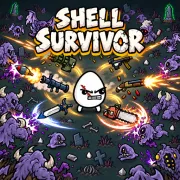
Shell Survivor is a top-down survival shooter where monsters and alien creatures enter the arena from every side. Your weapons aim and fire on their own. You control the fighter’s movement, looking for open ground while avoiding enemies and projectiles.
Defeated enemies drop green materials. Collecting them helps you level up during a wave and gives you resources to spend in the shop afterward. Each level offers four stat upgrades. The shop sells weapons and items that can raise damage, health, armor, speed, attack range, or other parts of the build.
The fighter can carry six weapons. Two matching weapons of the same tier merge into one stronger version, so a duplicate may improve the loadout more than a new weapon would. It also opens a slot for something else. A standard run lasts 20 waves, with tougher enemies and a final challenge near the end.
How to play Shell Survivor
- Press Start, choose a character and available difficulty, then select a starting weapon.
- Move with WASD or the Arrow keys before enemies close around the fighter.
- Keep a route open while the equipped weapons aim and attack automatically.
- Pick up green materials when you can reach them without cutting through a crowd.
- Choose one of four stat upgrades whenever the fighter gains a level.
- Spend materials in the shop between waves. Press Q to reroll its offers or E to lock an item for later.
- Merge two identical weapons of the same tier when you need the stronger version or an open slot.
- Continue until you clear wave 20. After a loss, change the part of the build that failed first.
Watch the ground ahead instead of chasing every drop. If enemies are closing around a patch of materials, leave it and keep moving. A safe route gives the weapons more time to clear the crowd.
Controls
Desktop
- Move with WASD or the Arrow keys.
- Press Q to reroll the shop.
- Press E to lock a shop item.
- Press Tab to view the current stats.
- Press Esc to pause.
- Use the mouse and left click for menus, characters, weapons, and upgrades.
- Attacks are automatic. There is no normal aim or fire button during a wave.
Mobile
A desktop browser with a keyboard is the best-supported setup. Touch controls have not been confirmed for the current embedded build.
Shell Survivor tips
Start moving early
Enemies approach from several directions, and standing still makes every exit smaller. Head toward open ground while the nearest group is still at weapon range. Moving around the edge of a crowd is safer than trying to squeeze through it after the gap closes.
Take materials along your route
Pick up materials that are already near a safe path. When a drop sits inside a packed group, circle back after the weapons make room or leave it behind. Losing health for one pickup can make the rest of the wave harder than it needs to be.
Build around coverage
Early in a run, another weapon can help cover an exposed side. Later purchases should fit the loadout you already have. Keep something that can handle enemies at close range, and choose stats that improve several weapons instead of one attack you rarely notice.
Merge for power or space
Combining two matching weapons gives you a stronger tier and frees one slot. It also replaces two separate attacks with one upgraded attack. Keep both copies while their coverage is useful, then merge when the extra power or open slot solves a clearer problem.
Lock before you reroll
If the shop shows an item you need but cannot afford, press E to keep it for the next visit. Use Q when you are looking for a specific weapon, merge, or defensive stat. Repeated rerolls can spend materials that would have paid for a useful item already on the screen.
Check the stats when a wave slows down
Press Tab when the build becomes hard to read. If enemies stay alive too long, look at damage, attack speed, or range. If the weapons clear the arena but a few hits end the run, spend the next upgrade on health, armor, or movement.
Weapons, materials, and wave systems
| Element | Role in the game | Player tip |
|---|---|---|
| Characters | Begin with different strengths and tradeoffs | Choose one that fits the starting weapon or build you want to try. |
| Automatic weapons | Aim and attack without a fire button | Watch the route ahead while the weapons handle nearby targets. |
| Six weapon slots | Limit how many attacks the fighter can carry | Add coverage early, then stop buying weapons that do the same job. |
| Matching weapon merges | Turn two same-tier copies into a stronger tier | Merge when you need more power or room for another weapon. |
| Materials | Pay for levels and shop purchases | Collect them from open ground and leave crowded drops alone. |
| Level-up choices | Offer four stat upgrades | Pick a stat that helps the weapons or defense you already use. |
| Shop locks and rerolls | Save one offer or replace the selection | Lock an item you want before spending materials on a reroll. |
| Waves and bosses | Add more pressure as the run continues | Keep enough health and movement to use the damage you have built. |
Why players like Shell Survivor
Most of a wave is spent reading the next opening and deciding whether a material drop is safe to collect. The weapons keep firing while you move, so the arena can go from clear to crowded without adding another attack button to manage.
The shop changes the pace. If a crowd survives for too long, the build may need damage, attack speed, range, or a weapon merge. If the enemies die quickly but the fighter cannot take a hit, health, armor, or movement becomes the next purchase. A failed run usually leaves a specific change to try.
A standard run ends after 20 waves, so each shop visit leads toward a clear finish. There is enough time for the loadout to change, but a weak choice can still show up when tougher enemies arrive.
More games like Shell Survivor
Undead Corridor is a tighter 2D survival shooter where you handle the aiming, firing, reloads, and close-range kicks yourself.
Rocket Fortress uses enemy waves and combat upgrades too. You launch missiles manually while Marines provide automatic support.
Backpack Dungeon moves the build decisions into a dungeon, where weapons and accessories compete for backpack space.
City Brawl has direct punches, kicks, blocks, and grabs. Clear each enemy wave, collect its rewards, and improve the fighter between stages.
FAQ
Is Shell Survivor free to play online?
Yes. You can play Shell Survivor for free in your browser on this page without downloading a separate app or signing up.
What type of game is Shell Survivor?
Shell Survivor is a top-down arena survival shooter with roguelite upgrades. You move through enemy waves while your equipped weapons aim and attack automatically.
How do you control Shell Survivor?
Use WASD or the Arrow keys to move. Press Q to reroll the shop, E to lock an item, Tab to view stats, and Esc to pause. Use the mouse for menus and upgrade choices.
Do you need to aim or shoot in Shell Survivor?
No. Equipped weapons aim and attack automatically. Your main job during a wave is to move, avoid enemies and projectiles, and collect materials when the route is safe.
How do weapons and upgrades work in Shell Survivor?
You can carry up to six weapons, buy items between waves, choose one of four stat upgrades when you level up, and merge two matching weapons of the same tier into a stronger version.
Can I play Shell Survivor on mobile?
A desktop browser with a keyboard is the best-supported setup. Touch controls have not been confirmed for the current embedded build.
Why is Shell Survivor not loading?
Give the game time to download its files, then reload the page if the frame stays blank. Check that your browser allows embedded content and try a current desktop browser.
Last updated
Last updated: October 28, 2026. Game availability, browser behavior, controls, and upgrade balance can change when the embedded build is updated.